
Learning Fruit Poppers begins with a few straightforward checks. Before pressing Spin, identify the total wager, open the paytable and distinguish the two feature symbols from the normal fruit icons. Once those details are clear, the five-reel layout becomes much easier to follow.
This hawkplay walkthrough explains the order in which to explore the controls and rules, using the SimplePlay game description as its reference.
Step 1: Check the Balance and Total Bet
Locate the balance, currency or credit indicator, and total bet display. The total bet is particularly important because it represents the cost of a paid spin; it should not be confused with a separate denomination or line-value setting.
The supplied article mentions bets from 0.20 to 1,500. Treat that as a reference-specific range and check the controls in the version you open. If the interface uses credits, first establish how those credits relate to the selected currency.
Step 2: Open the Paytable
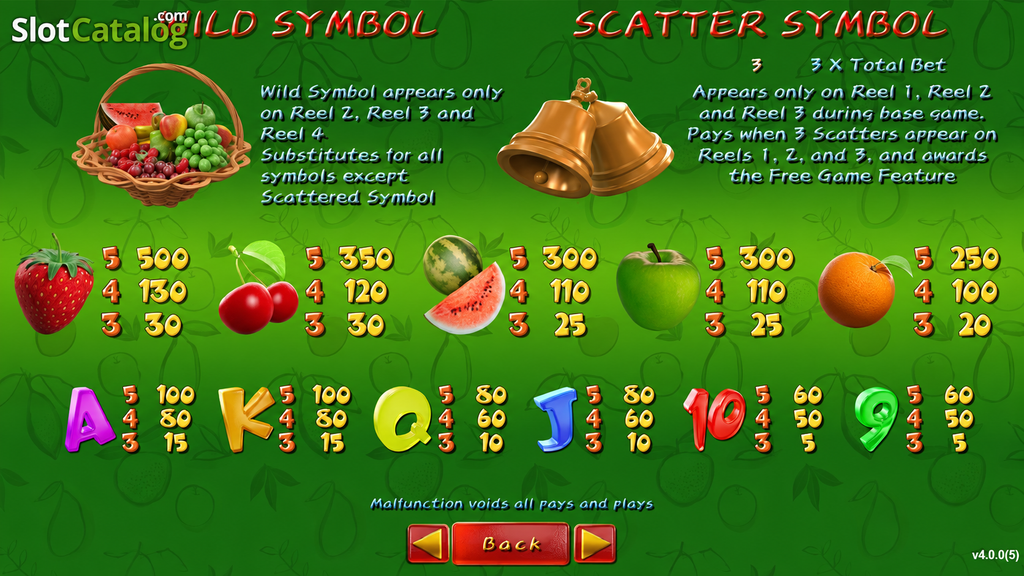
Fruit Poppers has 30 paylines on five reels. Its regular symbols include Strawberries, Cherries, Watermelons, Green Apples, Oranges and card ranks from 9 to Ace.
| Screen element | What to learn |
|---|---|
| Payline diagram | Which symbol positions form evaluated lines |
| Regular-symbol table | The values assigned to different match counts |
| Wild description | What the Fruit Basket can substitute for |
| Scatter description | Where the Bells must appear |
| Feature information | How the Free Spins selection works |
The reference ranks Strawberries highest among the fruit symbols. However, the largest printed symbol value is not automatically the game’s maximum total win. Read its unit and payout basis before interpreting it as money.
Step 3: Understand the Fruit Basket Wild
The Fruit Basket appears on reels 2, 3 and 4. It replaces regular symbols when the rules permit a winning combination, but it cannot replace the Bell Scatter.
For hawkplay readers inspecting a result, this means a basket belongs in the normal combination check. It should not be counted as an extra Bell when looking for a bonus trigger.
Step 4: Spin and Read the Result
After setting the desired wager, use Spin and allow the result to finish. Read the credited win against the highlighted combination and the paytable. Where a demo is available, virtual credits can be useful for examining this presentation without confusing a demonstration balance with real funds.
Step 5: Recognize the Free Spins Trigger
The described trigger requires three Bell Scatters across reels 1, 2 and 3. Once it activates, a fruit-themed selection offers five Free Spins totals.
| Available totals | What to do |
|---|---|
| 6 or 9 | Read the accompanying mode rules |
| 12 | Compare its full description with the other choices |
| 15 or 18 | Check conditions as well as the larger spin count |
Do not select solely on the assumption that the largest number has the best expected value. The complete mode descriptions determine what each choice offers.
First-Time Questions
Can I learn the interface in a demo?
Yes, if a demo is available for the version you are viewing. Its purpose is to demonstrate the controls and rules using virtual credits.
Does the game have an RTP figure?
The supplied description reports 95.87%. Confirm the loaded version’s information panel.
What should I remember after the walkthrough?
Read the total bet, distinguish the Basket from the Bells and consult the bonus descriptions before selecting. Those three habits give hawkplay readers a clear foundation for understanding Fruit Poppers.